I’d choose Frostmailer for fixed tenant bundles and Primeforge for reusable mailbox slots. Frostmailer starts at €30 per month for a tenant with an included .com domain. Primeforge starts at 10 slots, at about $4.50 per slot per month, plus domains.
My first check: how much of that paid capacity will you use? Then I’d compare setup time, pre-warmed options, DNS setup, admin access, replacements, support, and connection to your sending platform.
Quick Comparison
| Factor | Frostmailer | Primeforge |
|---|---|---|
| Capacity | 25, 50, or 100 inboxes per tenant | Per-mailbox slots, with a 10-slot minimum |
| Base price | €30 per tenant per month | About $4.50 per slot per month |
| Domains and DNS | One .com domain and DNS setup included | Domains cost extra |
| Standard setup | About 24 hours | About 30 minutes |
| Pre-warmed option | Four weeks of completed warm-up; two-tenant minimum | Feature listed; no published price |
| Replacement model | Scheduled infrastructure rotation | Not published |
| Platform fit | Connects to EmailBison, Smartlead, Instantly, PlusVibe, Success.ai and MasterInbox | Check OAuth support for your sender |
Setup time is not campaign readiness. I’d confirm access, support terms, and a working platform connection before paying. Convert Frostmailer’s euro prices to dollars for a fair cost comparison, and keep Microsoft’s limits separate from provider guidance. Neither service guarantees inbox placement.
How Frostmailer Tenants and Primeforge Slots Work
Frostmailer: 25-, 50-, and 100-Inbox Tenants
Frostmailer offers 25-, 50-, and 100-inbox tenants. Each package includes one .com domain and SPF, DKIM, and DMARC setup. You can order through its app, REST API, or MCP server. Frostmailer recommends 50 inboxes per tenant.
Standard tenants cost €30 per month. Pre-warmed tenants cost €50 each, with a two-tenant minimum, and include four weeks of completed warm-up. Standard Azure tenants go live in about 24 hours. Warm-up is included.
Primeforge sells slots rather than fixed tenant bundles.
Primeforge: Mailbox Slots and Replacements
Primeforge starts at 10 mailbox slots. It says standard mailboxes are ready in about 30 minutes.
| Capacity type | What you purchase or manage |
|---|---|
| Purchased | Total subscribed slots; the standard minimum is 10 |
| Active | Purchased slots occupied by live mailboxes |
Primeforge lists pre-warmed mailboxes as a feature but does not publish a price.
Capacity is only part of the workload. Check which tasks the provider handles and which rules Microsoft sets. This tells you what you can manage directly and what remains outside your control.
| Administration area | Provider-controlled scope | Microsoft-controlled constraints |
|---|---|---|
| Domain and DNS setup | Confirm which SPF, DKIM, DMARC, and tracking records the provider configures | Domains must meet Microsoft’s verification requirements |
| Mailbox administration | Check management tools, API access, and support for routine changes | Security and licensing enforcement can affect mailbox availability |
| Sending and enforcement | Check sending guidance and replacement procedures | Microsoft sets sending limits and can restrict or suspend accounts |
Microsoft’s limits include 10,000 recipients per mailbox per day and 30 messages per minute. These are platform ceilings, not cold-email targets. Reusing a replacement slot does not override Microsoft’s enforcement decisions.
Easiest Email Infrastructure Set Up Tutorial 2026 (Primeforge guide)
Compare Pricing, Setup, and Mailbox Management
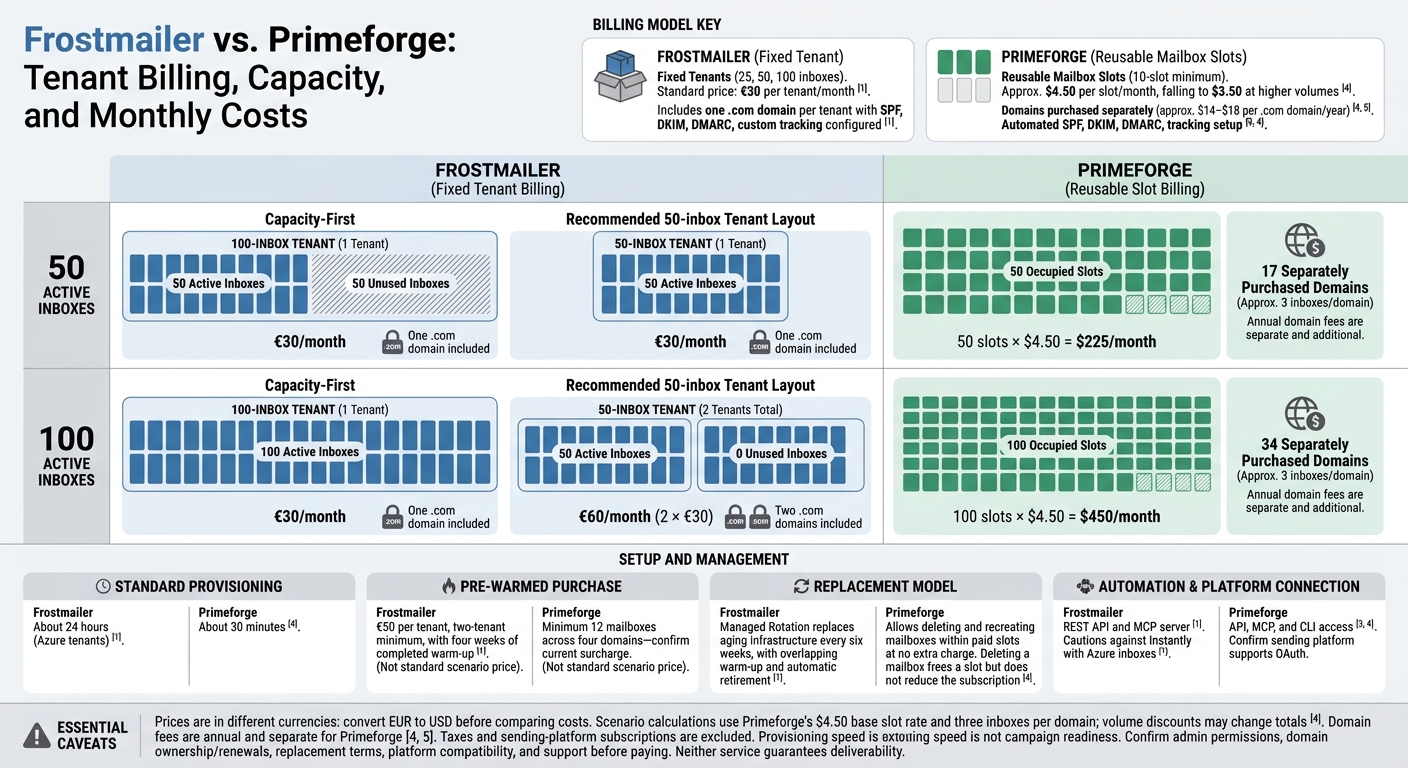
Frostmailer vs Primeforge: Capacity and Cost Compared
Compare total running costs, setup work, and mailbox control, not just the listed price.
| Purchase or management detail | Frostmailer Microsoft 365 | Primeforge Microsoft 365 |
|---|---|---|
| Minimum commitment and unit pricing | €30 per month per tenant; pre-warmed tenants cost €50 each, with a two-tenant minimum | About $4.50 per slot per month, falling toward $3.50 at higher volumes; 10-slot minimum |
| Capacity and tenant structure | 25, 50, or 100 inboxes on one included .com domain | Slots set mailbox capacity; one domain per tenant |
| Domains and DNS | Includes a .com domain and configuration of SPF, DKIM, and DMARC | $14 per year per .com domain |
| Pre-warmed purchases | Includes four weeks of warm-up | Offers pre-warmed mailboxes; confirm the current surcharge and minimum order |
| Replacements and maintenance | Managed infrastructure rotation available at custom pricing | Not published |
| Automation | REST API and MCP server | API (Swagger) |
| Sending platforms | Connects to EmailBison, Smartlead, Instantly, PlusVibe, Success.ai and MasterInbox | Confirm authentication support for your chosen sending platform |
Calculate Costs for Purchased Capacity
For 50 or 100 active inboxes, Frostmailer charges by tenant, while Primeforge charges by slot, plus domain fees. The tenant layout you choose affects Frostmailer’s total.
| Monthly cost item | 50 active inboxes | 100 active inboxes |
|---|---|---|
| Frostmailer: capacity-first purchase | €30: one 100-inbox tenant, 50 unused | €30: one 100-inbox tenant, none unused |
| Frostmailer: recommended 50-inbox tenant layout | €30: one tenant | €60: two tenants |
| Primeforge: slots fully occupied | $225: 50 slots × $4.50 | $450: 100 slots × $4.50 |
| Primeforge: domain count at 3 inboxes per domain | 17 domains, charged separately | 34 domains, charged separately |
| Domains included with Frostmailer | One .com domain per tenant | One .com domain per tenant |
| Taxes and sending-platform subscriptions | Excluded; add separately for either provider | Excluded; add separately for either provider |
These figures use Primeforge’s $4.50 base slot rate and assume three inboxes per domain. Larger orders can bring the rate near $3.50 per slot. Each domain adds about $14 per year.
Price is only part of the workload. Setup time, access, DNS management, and replacement handling also determine how much work stays with your team. A lower bill can mean more hands-on work if control is limited.
Check Setup Times, Admin Access, and Support
Provisioning speed does not mean campaign readiness. Frostmailer says Azure tenants arrive within 24 hours. Primeforge says mailboxes are ready in about 30 minutes. In either case, confirm that you receive usable credentials, configured DNS authentication, and a working connection to your sending platform.
Before paying, check administrator permissions, how credentials are delivered, replacement policies, and support commitments. Tenant access does not establish global admin rights. A claim of ownership also does not prove that you have global admin or registrar access.
Connect Mailboxes and Set Sending Controls
Once your mailboxes are provisioned, set up authentication and sending pace.
Verify DNS and Connect Your Sending Platform
Verify your custom domain in Microsoft 365. Then check SPF, DKIM, DMARC, and any tracking domain your sending platform uses. Send a test message and confirm authentication passes before launching campaigns.
Frostmailer supplies credentials through its app. It supports EmailBison, Smartlead, Instantly, and PlusVibe. Check that your account authenticates correctly with your sending platform.
Confirm that each connected account can send and receive, replies sync correctly, and authentication continues to pass. Set campaign caps and pacing in your sending platform before activation. Route DNS and provisioning issues to the provider, and sync or authentication problems to the sending platform.
Separate Provider Guidance From Microsoft Limits
Each Frostmailer Azure tenant sends about 200 emails per day in total, about 4 per inbox at the recommended 50 inboxes per tenant. Warm-up is included on standard tenants, and pre-warmed tenants arrive with four weeks of warm-up already done.
Provider recommendations are not Microsoft sending allowances. The table below separates guidance from enforced limits.
| Limit or control | Who sets it? | Practical meaning |
|---|---|---|
| Recommended outreach volume | Provider | Guidance, not a Microsoft-approved allowance |
| Mailbox recipient and message rates | Microsoft | Published ceilings include 10,000 recipients per day and 30 messages per minute. These are not cold-email targets. |
| Tenant-wide External Recipient Rate Limit (TERRL) | Microsoft | Applies across the tenant and depends on licensing. Buying more inboxes does not establish an equivalent sending allowance. |
| Daily campaign caps and pacing | User through the sending platform | Set these separately from provider provisioning. |
| Warm-up traffic | User and warm-up platform | Count this activity alongside campaign traffic. |
Start with the provider’s lower volume guidance. Increase caps only after bounce, throttling, and sync checks stay clean.
Conclusion: Choose by Capacity, Cost, and Control
Choose by capacity, cost, and control, not inbox count alone.
| Decision factor | Frostmailer | Primeforge |
|---|---|---|
| Capacity | Fixed tenants of 25, 50, or 100 inboxes | Reusable mailbox slots with a 10-slot minimum |
| Cost and domains | €30 per tenant per month, including one .com domain | Per-slot billing; .com domains purchased separately |
The choice comes down to fixed tenant bundles with an included domain or reusable slot-based capacity. Neither model guarantees deliverability.
Before paying, get written confirmation of current provider pricing, the billing term, domain ownership and renewal fees, setup time, admin access, replacement terms, platform compatibility, and support response times.
FAQs
How do I estimate my total cost per usable inbox?
Add mailbox fees, domain costs converted to monthly amounts, connection fees, and separately billed extras, such as pre-warming and sending platform subscriptions. Divide the total monthly cost by the number of usable inboxes.
Check what you’re billed for. Mailbox slots may carry a charge even when inactive. With flat tenant pricing, divide the tenant fee by the number of included inboxes to get the base cost per inbox.
Can I keep my domains if I cancel Frostmailer?
Domains come with your Frostmailer Azure tenant purchase. Confirm domain ownership and transfer terms with Frostmailer before you cancel.
If you want long-term domain ownership, buy domains separately through a registrar, then connect them to your cold email platform.
How do tenant-wide limits affect my campaign capacity?
Microsoft 365’s tenant-wide external recipient limit (TERRL) caps the number of external recipients across all mailboxes each day. The cap depends on your license count.
Without a verified custom domain, tenants using the default onmicrosoft.com domain are typically limited to about 100 external recipients per day. To increase capacity, verify a custom domain and spread sending volume across multiple tenants and domains, rather than exceeding recommended per-mailbox limits.