I’d choose Google Workspace Direct for tenant control, or compare managed providers if you want less setup work. Before buying, get admin access, domain ownership, and exit rights in writing. A low inbox price does not protect you from account suspension.
As of November 11, 2026, this review covers six providers, not seven. I compare price, DNS setup, account control, support, and sending-tool connections. SendKit remains unverified, so I would not treat it as a recommendation.
Quick Comparison
| Provider | Listed price | Main reason to consider it | What I’d check |
|---|---|---|---|
| Frostmailer | €2.50 to €3.00 per inbox; €8.00 pre-warmed | Managed DNS setup, full admin access, API ordering | Billing period, recovery control, and domain costs |
| Google Workspace Direct | $7.00/user/month annually; $8.40 flexible | Direct tenant and billing control | Time and costs for setup, domains, and warm-up |
| InboxKit | $3.00/mailbox/month; $2.50 annual | Per-mailbox pricing and fast automated setup | Conflicting price claims, warm-up fees, and recovery terms |
| Zapmail | Packages from $39/month for 10 mailboxes | Package pricing and automated setup | Renewal costs, domain release, and plan limits |
| Premium Inboxes | $2.80 to $3.50/inbox, billed every 4 weeks | Managed setup and replacement coverage | Transfer rights and coverage exclusions |
| SendKit | Unverified | No recommendation yet | Pricing, ownership, setup, and support |
My rule: test one mailbox before placing a bulk order. Check sending, reply sync, and reconnection with your tools. Then compare the full first-year bill, not just the inbox rate. Google’s spam policies still apply, regardless of provider or sending volume.
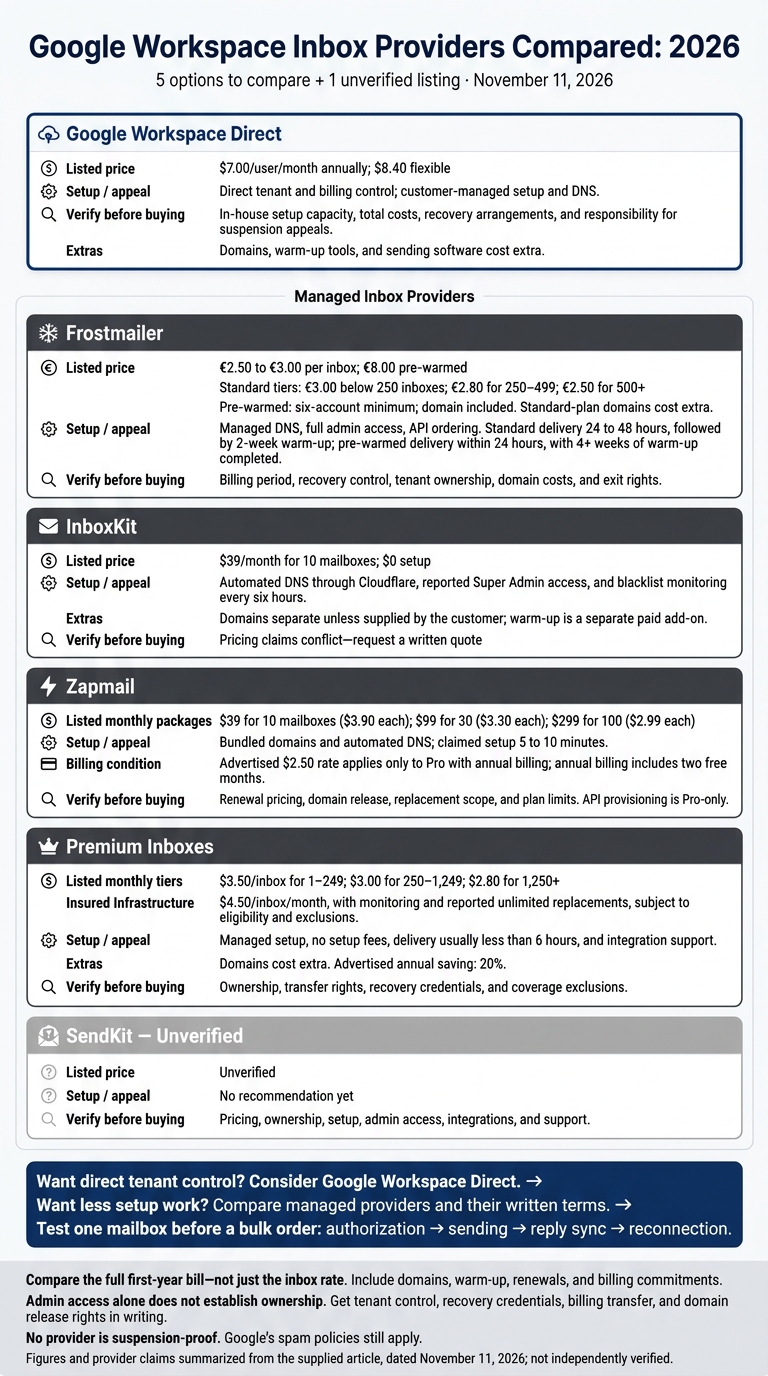
Google Workspace Inbox Providers Compared: 2026
How To Get Google Workspace Cold Email Accounts for $2
1. Frostmailer
Frostmailer suits teams that want managed Google Workspace inboxes, full admin control, and short setup times.
Total inbox cost
Frostmailer lists four inbox prices: €3.00, €2.80, €2.50, and €8.00. Pre-warmed plans include a domain; other plans require a separate domain purchase.
| Frostmailer plan | Quoted price per inbox | Order size | Domains | Delivery / warm-up | Daily sending guidance | Access | Best fit |
|---|---|---|---|---|---|---|---|
| Google Workspace | €3.00 | Below 250; 15-inbox minimum | Purchased separately | 10 to 24 hours | Up to 15 per inbox | Full admin | Smaller deployments |
| Google Workspace | €2.80 | 250 to 499 | Purchased separately | 10 to 24 hours | Up to 15 per inbox | Full admin | Growing teams |
| Google Workspace | €2.50 | 500+ | Purchased separately | 10 to 24 hours | Up to 15 per inbox | Full admin | Larger mailbox fleets |
| Pre-warmed | €8.00 | Six-account minimum | Included | 4 weeks of warm-up completed | Not stated | Not stated | Fast deployment |
Provisioning and DNS
Standard plans allow up to three inboxes per domain. Accounts arrive in 10 to 24 hours. Pre-warmed accounts come with four weeks of warm-up already completed.
Ownership and admin access
Frostmailer says its Google inboxes come with US IP accounts. Admin access lets you create users and reset passwords.
Admin access alone does not establish ownership or guarantee a replacement. Before paying, get written terms covering ownership, recovery credentials, portability, and replacement eligibility.
Platform compatibility and support
You can manage orders through app.frostmailer.com, a REST API, or an MCP server. Frostmailer integrates with EmailBison, Smartlead, Instantly, PlusVibe, MasterInbox, and Success.ai. It also advertises 24/7 support.
2. Google Workspace Direct
Google Workspace Direct is the baseline option for teams that want full control and can handle setup themselves.
Total inbox cost
Google Workspace Direct costs $7.00 per user/month on an annual plan or $8.40 with flexible billing. Domains, warm-up tools, and sending software cost extra.
| Specification | Google Workspace Direct |
|---|---|
| Business Starter, annual commitment | $7.00 per user/month |
| Business Starter, flexible billing | $8.40 per user/month |
| Domain registration | Separate purchase |
| Bundled warm-up | Not included |
Provisioning and DNS
You register domains, sign up for Workspace, create users, and configure MX, SPF, DKIM, and DMARC records. Set a 2048-bit DKIM key for each sending domain.
The setup is straightforward, but you'll do more work in-house than with a managed inbox provider, especially for DNS and warm-up.
Ownership and admin access
Buying directly gives you control of the tenant, billing, and admin rights. It also puts account recovery and suspension appeals on your team. Your Super Admin controls users, recovery details, security settings, and audit logs.
Platform compatibility and support
Workspace connects to Salesforge, Instantly, Smartlead, Lemlist, and ReachInbox. Google support covers the seat, but not warm-up or deliverability.
Workspace technically allows up to 2,000 emails per day, but cold email teams send far fewer per inbox. That lower volume does not eliminate suspension risk.
Direct purchase best suits teams that want full control and can manage DNS, security, and compliance in-house.
3. InboxKit
InboxKit offers managed provisioning for teams that don’t want to administer every Google Workspace account themselves. The trade-off: less setup work, but less clarity on recovery and replacement terms.
Total inbox cost
InboxKit charges $3.00 per mailbox a month, or $2.50 on annual billing, with no minimum and no base fee.
| Specification | Reported offering |
|---|---|
| Minimum | None |
| Price | $3.00/mailbox/month; $2.50 on annual billing |
| Base fee | None |
| Warm-up | $3/mailbox/month add-on |
Provisioning and DNS
InboxKit says it provisions Google Workspace accounts in under 60 seconds. Before buying, ask which Workspace edition you’ll receive. Also check whether that timeline means you can access and use the mailbox, rather than just having an account created.
Ownership and admin access
Confirm who controls recovery and offboarding, and get recovery credentials, cancellation terms, and billing transfer details in writing.
Platform compatibility and support
InboxKit offers a REST API, webhooks and an MCP server. Its pricing page lists email and chat support. Check what support your plan includes for connection failures, since replacement terms aren’t clearly documented.
Best fit: teams wanting per-mailbox pricing with no minimum and automated setup. Google’s sending limits still apply.
4. Zapmail
Zapmail suits teams that want managed Google Workspace mailboxes and fast setup.
Total inbox cost
Zapmail offers Google Workspace mailboxes in packages of 10, 30, and 100.
| Plan | Monthly package | Included mailboxes | Cost per included mailbox | Each extra mailbox/month | Bundled domains |
|---|---|---|---|---|---|
| Starter | $39 | 10 | $3.90 | $3.50 | Extra |
| Growth | $99 | 30 | $3.30 | $3.25 | Extra |
| Pro | $299 | 100 | $2.99 | $3.00 | Extra |
Pricing steps up after 12 months. Before committing, ask for a written quote covering renewal pricing and any separate charges for pre-warmed inboxes, whose prices aren't publicly listed.
Provisioning and DNS
Zapmail advertises 5-minute setup, though its help centre says Google mailboxes can take up to about 3 hours. It offers a pre-warmed product, but pricing isn't published.
Ownership and admin access
| Specification | Reported terms |
|---|---|
| Domain nameservers | Must remain pointed to Zapmail |
| Replacements | Coverage varies. Confirm in writing whether it covers the inbox, domain, or workspace. |
| Refunds | No-refund policy |
Get these terms in writing before choosing annual billing.
Platform compatibility and support
Zapmail supports connections to more than 50 tools, including Instantly, Smartlead, Reply, and Lemlist. API provisioning is available only on Pro.
5. Premium Inboxes
Premium Inboxes is a managed option for teams that want fast setup and replacement coverage without managing each account by hand.
Total inbox cost
Pricing is billed every 4 weeks and depends on inbox count: $3.50, $3.00 or $2.80 per inbox by volume tier.
Unlimited replacement inboxes are included on all tiers. Premium Inboxes doesn't sell domains, so you bring your own.
Provisioning and DNS
Delivery is listed as under 6 hours.
Ownership and admin access
| Specification | Reported terms |
|---|---|
| Account licensing | Not verified |
| Domain ownership | Bring your own; Premium Inboxes doesn't sell domains |
| Administrative access | Not verified |
| Portability | Transferability must be confirmed in writing |
| Suspension handling | Unlimited replacement inboxes on all tiers |
Confirm licensing, permissions, and replacement eligibility in writing before you order.
Platform compatibility and support
Premium Inboxes supports direct upload to Smartlead and Instantly.
Best fit: Agencies that want managed setup and replacement coverage.
6. SendKit
SendKit remains a provisional listing until its pricing, ownership, and support terms are documented.
Total inbox cost
SendKit’s pricing is unverified, so there’s no reliable monthly total to publish.
Provisioning and DNS
Before paying, confirm delivery time and who handles domain registration.
More important than setup claims: who controls the tenant and what rights you have when leaving.
Ownership and admin access
The Google account type, domain ownership, admin access, API rights, and replacement terms are all unverified.
Platform compatibility and support
Before ordering, request connection docs, a test mailbox, and written support and suspension terms.
Best fit: Buyers who can verify every contract term before purchase. Trade-off: No public proof of pricing, ownership, or support.
Compare Costs, Setup, Control, and Integrations
Compare first-year costs, including domains, warm-up, renewals, and billing terms. A low inbox price means little if the account isn't ready to send, limits your control, or won't connect to your tools.
Costs: Compare pricing at your expected inbox count. Check minimum commitments and any separate platform fees.
| Provider | Below 50 inboxes | 50, 250 inboxes | 500+ inboxes | Pricing caveat |
|---|---|---|---|---|
| Frostmailer | €3.00/inbox | €3.00/inbox; €2.80 at 250 | €2.50/inbox | Billing frequency unspecified. Domains excluded; pre-warmed plan costs €8/account with a domain included. |
| Google Workspace Direct | $8.40/user/month flexible; $7.00 annual | Same rate | Same rate | Lower rate requires an annual commitment; domains cost extra |
| InboxKit | $3.00/inbox | $3.00/inbox | $2.50/inbox on annual billing | The $2.50 rate requires annual billing at any volume; warm-up costs $3/mailbox/month extra |
| Zapmail | About $3.90/inbox on 10-inbox plan | About $2.99/inbox on 100-inbox plan | About $2.99/inbox | Domains extra; pricing steps up after 12 months |
| Premium Inboxes | $2.80 to $3.50/inbox by tier | $2.80 to $3.50/inbox by tier | $2.80 to $3.50/inbox by tier | Volume breakpoints not verified; billed every 4 weeks; domains are bring-your-own |
| SendKit | Unverified | Unverified | Unverified | No verified first-year or recurring total |
Setup: Compare when accounts are ready to send, not just how fast they're delivered. US IP claims may refer to account access, sending routes, or both.
| Provider | Delivery vs. send-ready status | DNS and warm-up | US IP evidence |
|---|---|---|---|
| Frostmailer | New standard accounts; pre-warmed option has completed four weeks of warm-up | DNS configured for every order | US IP accounts offered |
| Google Workspace Direct | New accounts; no managed campaign launch | Manual DNS; no included warm-up | No dedicated US sending-IP commitment stated |
| InboxKit | New accounts | Warm-up sold separately | US IPs; shared vs dedicated not stated |
| Zapmail | Pre-warmed option available | Not verified | Not verified |
| Premium Inboxes | New accounts | Not verified | Not specified |
| SendKit | No verified setup data | No verified setup data | No verified setup data |
Control: A send-ready inbox still needs a clear ownership and recovery path. Admin access alone doesn't mean you own the account if the provider controls the tenant, billing, or domain. Get written rights for tenant transfer, billing transfer, recovery credentials, and domain release.
| Provider | Tenant and domain ownership | Admin and recovery | Exit rights to confirm |
|---|---|---|---|
| Frostmailer | Full admin Google mailboxes; domains not included | Confirm customer-controlled recovery credentials | Tenant transfer, billing transfer, and domain release |
| Google Workspace Direct | Customer-owned tenant and registrar | Super-admin access | Full portability and data export |
| InboxKit | Not verified | Not verified | Transferable setup and recovery control |
| Zapmail | Domains extra; nameservers stay with Zapmail | Not verified | Cancellation and registrar-release terms |
| Premium Inboxes | Bring-your-own domains | Not verified | Written ownership, recovery, and transfer terms |
| SendKit | Unverified ownership terms | Unverified admin details | Unverified exit terms |
Support and monitoring: Match support to your team's ability to handle authentication failures and account suspensions.
| Provider | Support and monitoring | Replacement coverage | API and workflow support |
|---|---|---|---|
| Frostmailer | 24/7 mailbox support | Confirm coverage and exclusions in writing | App, REST API, and MCP server |
| Google Workspace Direct | Not specified | Not specified | Customer-managed administration |
| InboxKit | Email and chat support | Confirm eligibility and turnaround | API and webhooks |
| Zapmail | Support hours and escalation path unspecified | Confirm suspension terms in writing | API appears plan-gated |
| Premium Inboxes | Not verified | Unlimited replacement inboxes on all tiers | API availability unclear |
| SendKit | Unverified support details | Unverified replacement policy | Unverified automation details |
Integrations: Test one mailbox before placing a bulk order. Check authorization, sending, reply sync, and reconnection with your sending tools.
| Provider | EmailBison | Smartlead | Instantly | PlusVibe | MasterInbox | Success.ai |
|---|---|---|---|---|---|---|
| Frostmailer | Verified | Verified | Verified | Verified | Verified | Verified |
| Google Workspace Direct | Not verified in supplied material | Not verified in supplied material | Not verified in supplied material | Not verified in supplied material | Not verified in supplied material | Not verified in supplied material |
| InboxKit | Not verified in supplied material | Not verified in supplied material | Not verified in supplied material | Not verified in supplied material | Not verified in supplied material | Not verified in supplied material |
| Zapmail | Not verified in supplied material | Verified | Verified | Not verified in supplied material | Not verified in supplied material | Not verified in supplied material |
| Premium Inboxes | Not verified in supplied material | Verified | Verified | Not verified in supplied material | Not verified in supplied material | Not verified in supplied material |
| SendKit | Not verified in supplied material | Not verified in supplied material | Not verified in supplied material | Not verified in supplied material | Not verified in supplied material | Not verified in supplied material |
Pros, Cons, and Sending Risks
The comparison above covers cost and setup. This section focuses on the risks that matter once sending starts.
Choose for control and recovery, not just setup speed. Shared admin control can create a single point of failure. A managed service may save time, but that does not mean you own or control the accounts.
| Provider | Best-fit team | Main advantage and drawback | Risk |
|---|---|---|---|
| Frostmailer | Price-sensitive teams wanting managed setup | Low-cost managed mailboxes; domains excluded. | Confirm recovery and billing control before scaling. Google enforcement still applies. |
| Google Workspace Direct | Small teams with in-house administration | Full control, but manual setup and higher retail cost. | Your team handles restrictions and appeals without replacement coverage. |
| InboxKit | Agencies managing many accounts | No minimum; warm-up costs extra. | Confirm recovery control and replacement terms. |
| Zapmail | Teams wanting fixed monthly billing | Package pricing; renewals cost more after 12 months. | Confirm domain release rights and replacement caps before committing. |
| Premium Inboxes | Teams wanting managed setup and coverage | Recovery support is available, but it cannot prevent first-time suspension. | Confirm transfer rights. Replacements do not restore lost reputation. |
Managing risk also means following policy, not just choosing a mailbox provider. Treat about 15 cold emails per Google mailbox per day as a rough ceiling, not a guarantee. Check Google’s current sending limits before planning volume. Staying below those limits or bulk-sender thresholds does not exempt you from Google’s spam policies.
Start with low volume. Increase it only when delivery signals stay healthy. Verify addresses, remove hard bounces, and honor unsubscribe requests across every campaign. A rising hard-bounce rate is a reason to pause and audit, not something to accept.
Watch complaints as well as bounces. A valid address does not mean its owner wants your message. Keep outreach off the domain you use for core business email.
CAN-SPAM still applies. Use accurate sender information, nondeceptive subject lines, a valid postal address, and a clear opt-out. Honor unsubscribe requests within 10 business days. If a mailbox gets restricted, your response matters more than the plan name: stop affected campaigns and investigate list quality, complaints, and authentication.
Which Google Workspace Inbox Provider Should You Choose?
Your choice comes down to direct tenant ownership or managed setup. Compare cost, setup, control, support, and integrations against the terms each provider puts in writing.
| Decision factor | Buying guidance | Terms to verify |
|---|---|---|
| Tenant control | Google Workspace Direct gives you direct control over your tenant, billing, and super admin access. | Recovery access and offboarding rights. |
| Managed setup | Frostmailer offers managed provisioning with full admin access. | Tenant ownership, billing responsibility, and delivery terms. |
| Domain handling | Frostmailer configures SPF, DKIM, and DMARC. Standard plans exclude domains; pre-warmed accounts include one. | Registration ownership, renewal pricing, and transfer rights. |
| Workflow fit | Frostmailer supports API ordering and connects to EmailBison, Smartlead, Instantly, and PlusVibe. | Test authorization, sending, reply sync, and reconnection before scaling. |
| Support | Frostmailer advertises 24/7 support. | Escalation procedures, replacement eligibility, and exclusions. |
| Control and suspension risk | Google Workspace Direct gives you ownership, not protection from enforcement. | No provider is suspension-proof. |
No provider wins every category. Use the table to match how you want to buy and manage inboxes with terms you can verify in writing.
If a provider bundles domains, get registration and transfer rights in writing before buying. For volume purchases, also require written terms covering ownership, portability, sending limits, renewal pricing, replacement scope, and suspension handling.
FAQs
How can I verify that I own my mailboxes?
Check that all four conditions are met:
- You have Google Workspace super admin access. You can manage users, reset passwords, and change billing settings.
- You control your sending domains. They’re registered in your registrar account or can be transferred to you on request, with no lock-in.
- Your licenses are standard, authorized commercial Google Workspace licenses. They aren’t shared bulk-tenant accounts.
- You keep the right to move or export your mailboxes and data if you cancel.
How many inboxes do I need for my outreach?
Start with your daily send target and work backward. Plan for up to about 15 cold emails per Google inbox per day once accounts are fully ramped up.
Keep each sending domain to no more than three inboxes to protect deliverability and reduce risk.
Add a 15% to 20% buffer to your total inbox count to cover accounts that are underperforming, warming up, or suspended.
Can I switch providers without losing email history?
It depends on who owns and controls the Google Workspace tenant. If you have full super admin access and the domains are registered in your name, you can manage or migrate the account without losing access to your data.
If the provider controls the tenant, cancellation or failed provider billing could leave you without access or account history. Before you start, confirm that you have full admin ownership and the right to transfer the tenant to your own billing.